Cloud computing with Amazon Web Services

Deploying web applcaition on AWS
Summary: In this project, a library management system web application is deployed on Amazon Web Services cloud platform. In which -
- EC2 instances are auto-scaled with Elastic load balancer ELB to handle web traffic.
- The applciation is running on my domain csye6225-su19-deogade.me which is a hosted zone on Route53.
- Networking resources in AWS essential for hosting app on virtual private cloud VPC were created with cloudformation yaml script and automated with bash scripts.
- The user is sent a password reset email via Simple Email Service SES by subscribing to Simple Notification Service SNS.
- The user’s email record is stored in DynamoDB table with a 15 minutes time-to-live TTL.
- The functionality operates on serverless computing with Lambda funtion.
- Images for books are stored in S3 bucket.
- Code deploy bundle is stored in different S3 bucket.
Technology stack
- Developed using Flask - a micro web framework written in Python.
- Plugged with uWSGI application server to launch the application.
- Nginx to act as a front end reverse proxy.
- Uses MySql for the relational database.
- Served on CentOS7.

Mysql database
Person
| Field | Type | Null | Key | Default |
|---|---|---|---|---|
| id | varchar(100) | No | PRI | NULL |
| username | varchar(100) | Yes | NULL | |
| password | varchar(100) | Yes | NULL |
Books
| Field | Type | Null | Key | Default |
|---|---|---|---|---|
| id | varchar(100) | No | PRI | NULL |
| title | varchar(100) | Yes | NULL | |
| timeofcreation | varchar(100) | Yes | NULL |
An additional field of “time of creation” is added in books table to maintain time-to-live of DynamoDB
Image
| Field | Type | Null | Key | Default |
|---|---|---|---|---|
| id | varchar(100) | No | PRI | NULL |
| url | varchar(100) | Yes | NULL |
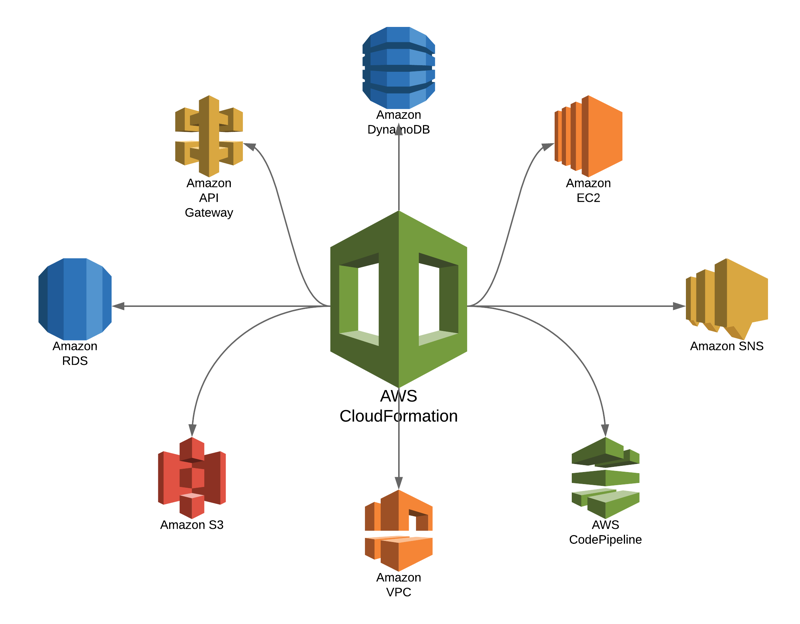
Cloudformation
Automating creation of all aws resources
- security groups - web, instance, rds
- internet gateway, VPC, subnets, route table
- dynamodb, rds, instance
- roles, policies
- user data to send to instance scripts can be found here
CI/CD
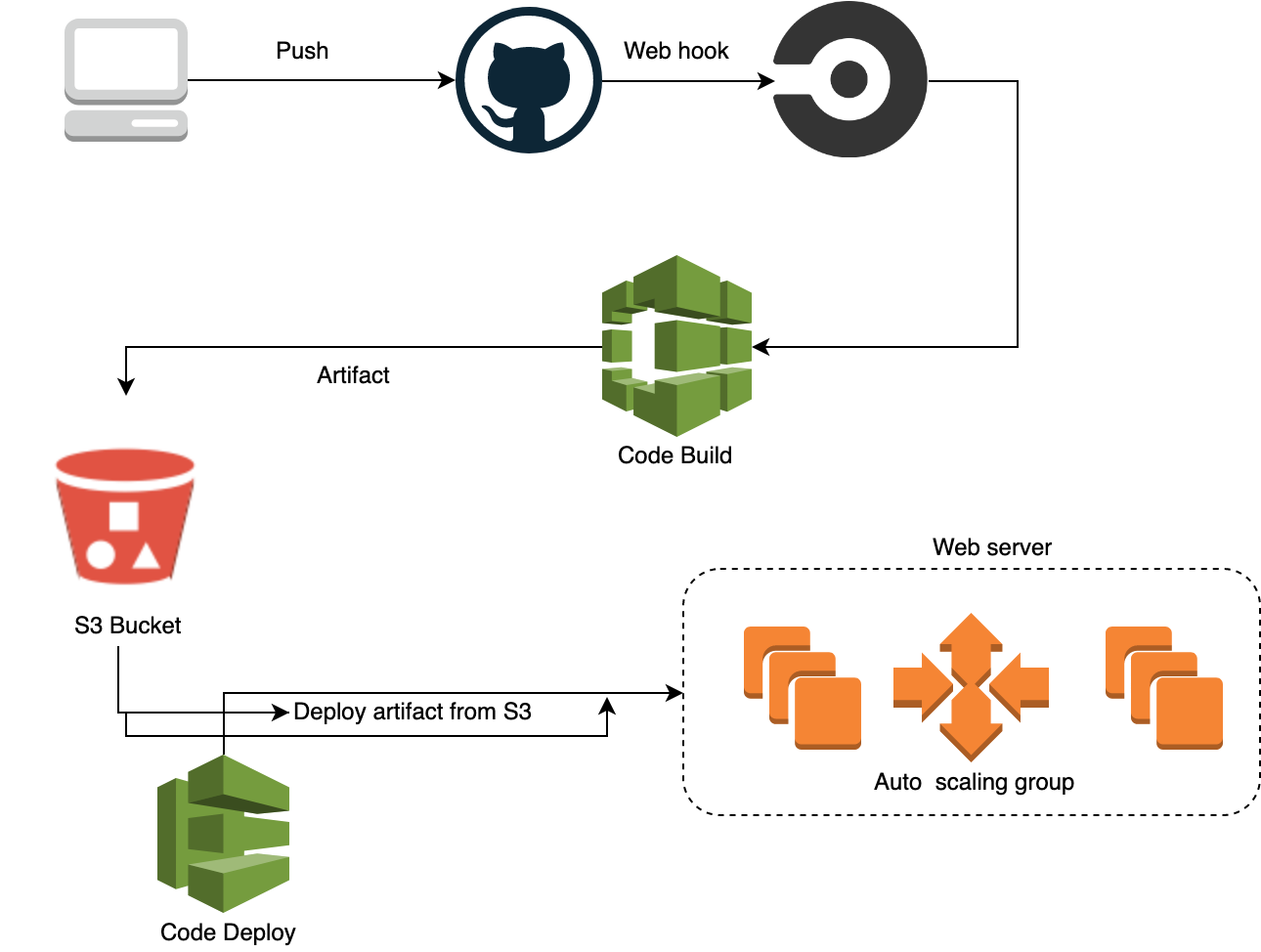
- CircleCI and AWS code-deploy are integraeted together in config.yaml script to test, zip and upload the all web applciation files onto code-deploy S3 bucket.
- While auto-scaling with load balancer, initially code will be deployed on 3 instances.
- Any changes made to master branch will trigger a new build
- refer appsepec.yml file in the root of the repository
Build instructions
Requirements:
- API testing tool - install Reslet plugin, which is a chrome’s extension
- User need to have two S3 buckets, eg:
- for webapp: yourdomain.tld
- for code deploy: code-deploy.yourdomain.tld
-
where yourdomain.tld should be replaced with your domain name
git clone git@github.com:Adhira-Deogade/cloud-computing-aws.git
cd cloud-computing-aws/webapp
-
Run a build through API without having to make any commit to master:
curl -u e7dc1223f96c97299b257a6cb26bffd9cf897bdc -d build_parameters[CIRCLE_JOB]=build https://circleci.com/api/v1.1/project/github/Adhira-Deogade/cloud-computing-aws/tree/master - refer config.yml file in .circleci folder
Identity Access Management(IAM) roles and policies
1. Group
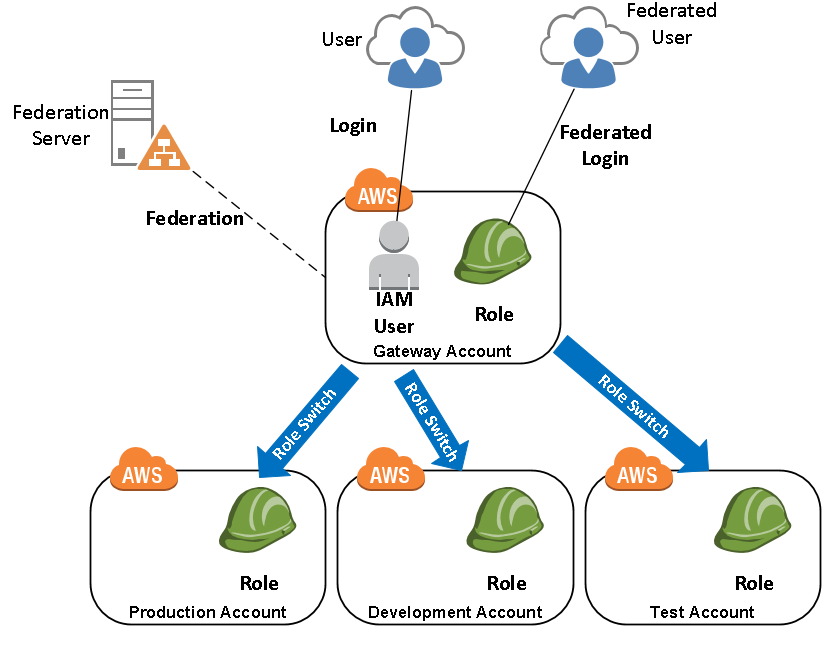
Three groups:
- Administrator with admin access
- Staff with read only access
- Team with read only access
2. Users
- users in staff and team given accesss to sign-in into console with key and password (only read the resources)
- admin user with programmatic access - create and delete resources
- all users assigned to respective groups
3. Roles and policies
5 roles:
- Auto scaling service role has an attached policy of managing EC2 instances, cloud-watch agent, load balancer, instance profile, and simple notification service
- Elastic load balancer service role has an attached policy of managing network interface with instance, and logging.
- RDS service role has an attached policy of managing, logging, kinesis, and interfacing with instance.
- Support service role has an attached policy of supporting EC2, RDS, logging, cloudwatch, RDS, IAM, ELB, codebuild, codedeploy, cloudformation, api, s3, web-application-firewall.
- Trusted role with policy to manage trusted resources. Apart from AWS managed policies, I created following policies to manage aws resources:
Auto-scaling of EC2 instances
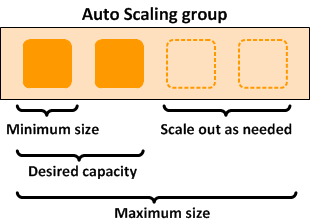
- Auto scaling is important to make sure that the application is running irrespective of the load on the web-server.
- If there are around 1000 users simultaneously access the application, the server needs scaling and automatically new instances will be created, up and running to handle those API requests.
- I deployed the application on 3 EC2 instances and scaled max to 5 instances.
- Auto scaling group with attached security groups make it simple to manage the instances and code deployment.
Serverless computing - resetting password
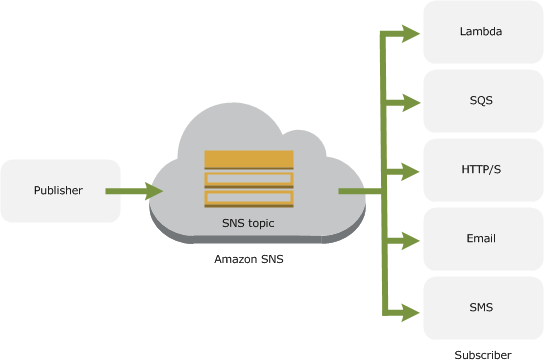
Lambda function
- This runs code in response to events and automatically manages the computing resources required by that code.
- This function is invoked when user requests to reset password through API.
- It subscribes to SNS topic
- Called “handler function”
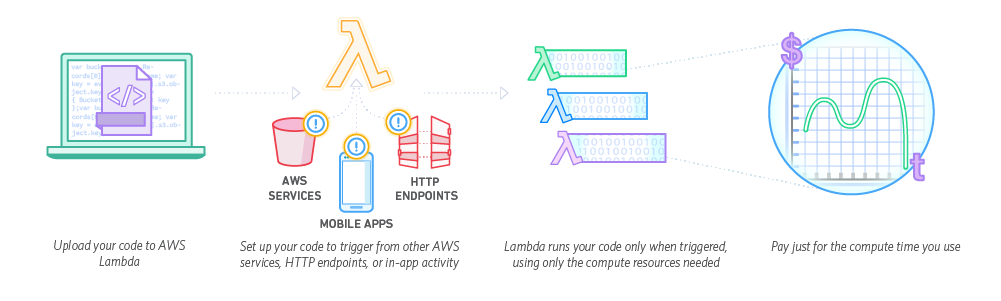
Simple Notification service (SNS)
- This event is triggered when API is hit
- Since lambda function is subscribed to this topic, it is executed when this event is triggered
Simple Email Service
- Email is composed with sender, receiver, subject and body
- Email is sent from the domain’s MX record
DynamoDB table
- Users email is stored in DynamoDB table
- TTL record field is defined during table creation
- python boto3 client will set it to 15 minutes in epoch time format
- after 15 minutes, the record loses its validity and sender needs to get another reset email
Integration:

Security
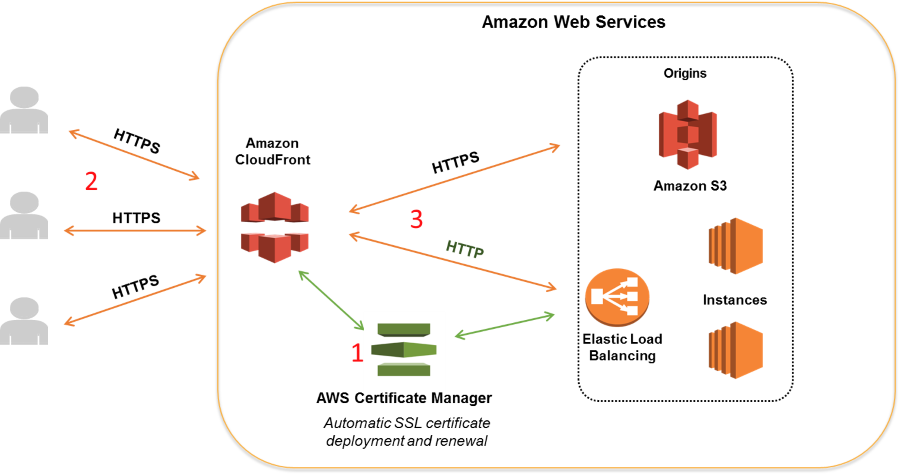
HTTPS
- Create an SSL certificate from here
- Validate with DNS by creating a CNAME record in Route 53
- To manage HTTPS traffic from load balancer to auto scaling group instances, SSL certificate is essential
Security groups
- Web app security group - incoming and outgoing traffic to web application - open port 80
- Databse security group - incoming and outgoing traffic to RDS instance - only web app can access the database and no one else outside the network. port 3306
- ELB security group - - incoming from 8080 and outgoing traffic 80 (webapp)
Elastic load balancer
To handle multiple http requests to web server, load balancer comes into effect

Python - SDK
boto3 client to create and implement aws resources
- s3 bucket - uploading images
- generating pre-signed url - A user who does not have AWS credentials or permission to access an S3 object can be granted temporary access by using a presigned URL.
- email service (SES)
- notification service (SNS)
CloudWatch
- Cloudwatch agent (a json file) needs to be placed in the system on which the web server is running.
- It is setup in EC2 instances by installing them in the amazon machine image (AMI) - CentosOS7
wget https://s3.us-east-1.amazonaws.com/amazoncloudwatch-agent-us-east-1/centos/amd64/latest/amazon-cloudwatch-agent.rpm
sudo rpm -U ./amazon-cloudwatch-agent.rpm
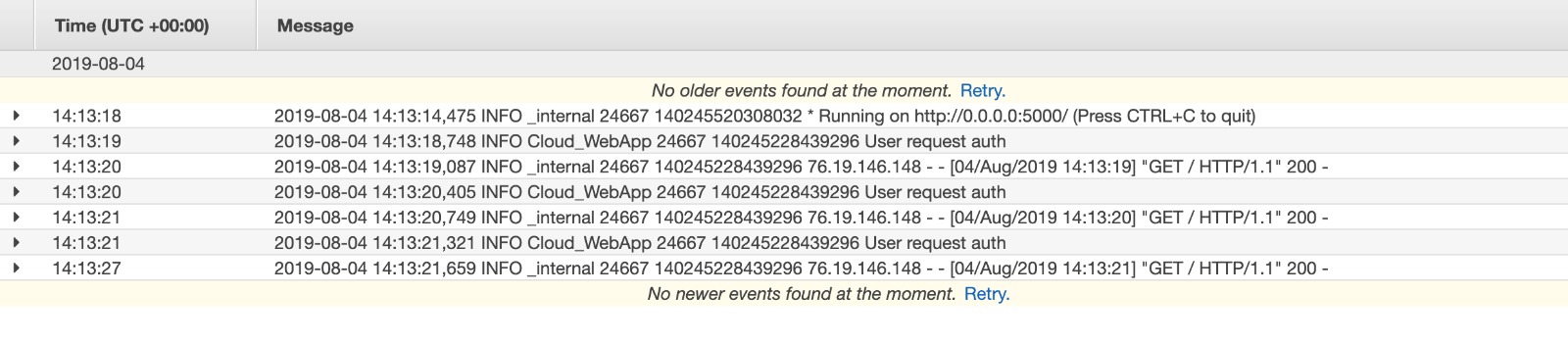
1. Cloudwatch logs
- To continously monitor web applcaition, use cloudwatch logs.
- Setting up logging config to lowest level of INFO, all important and trivial logs can be captured.
2. Cloudwatch metrics
- Metrics help to understand the value of each API end point. To obtain the frequency, metrics can be used.
- In combination with statsd, flask-API end points can be monitored with AWS cloud watch.
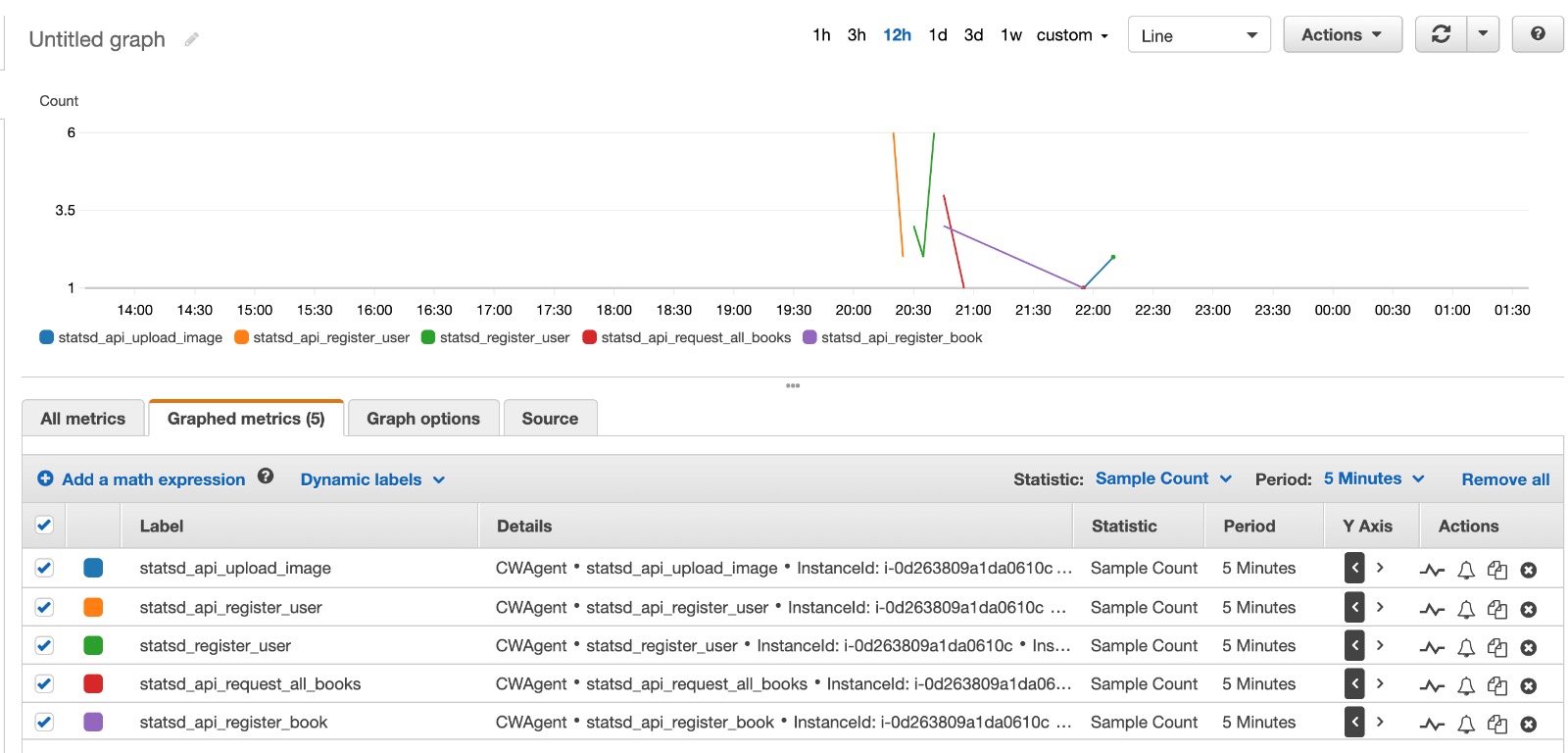
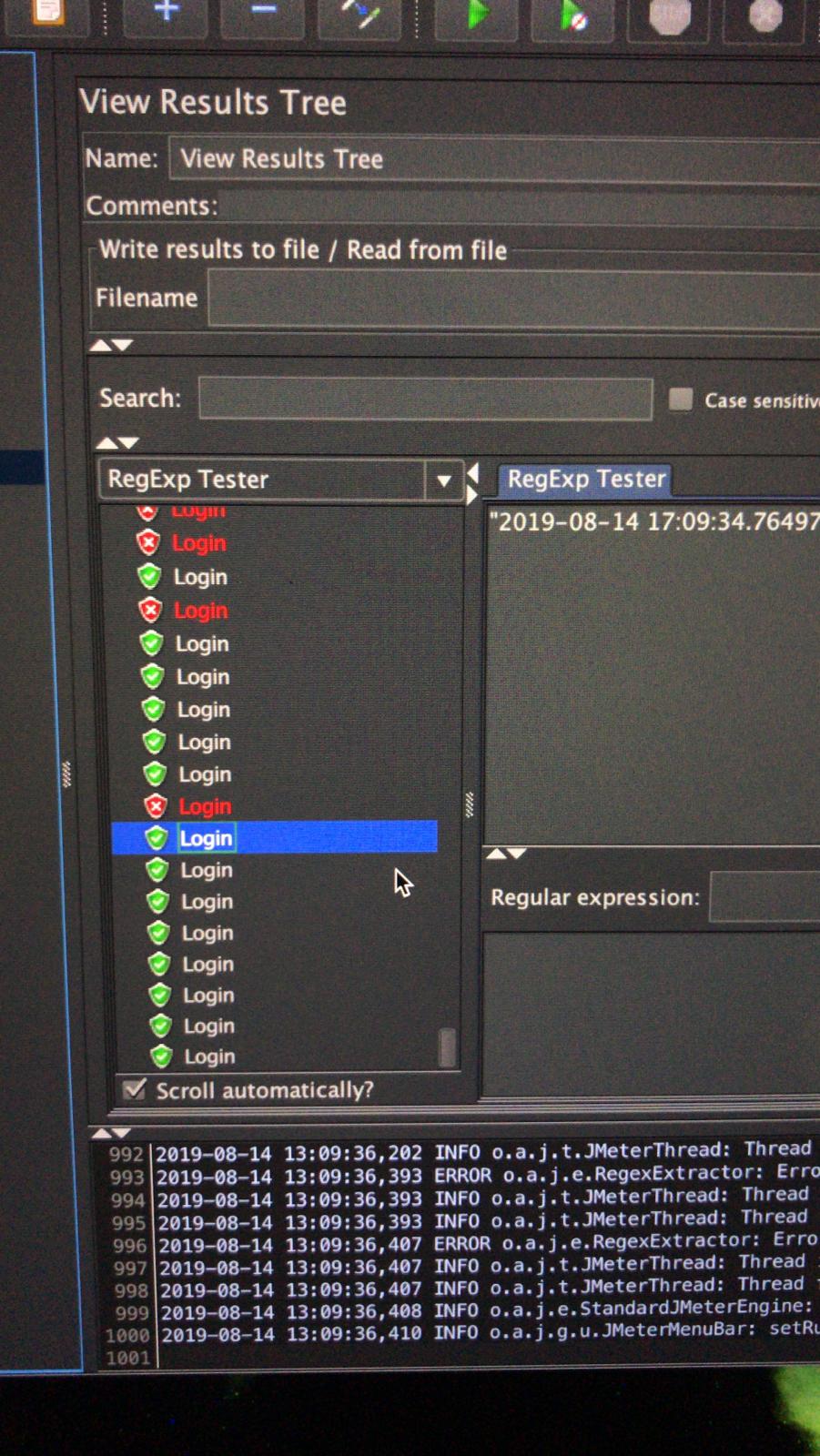
jmeter load testing
To test the auto-scaling of EC2 instances through load balancer, 1000 api requests are made continuously to increase load on web-server by calling following end-points -
- register user
- login
- register book
- get book details
- upload image to book
Result:
Running Tests
pytest <filename>.py- Open Restlet and test the following web end points -
| No. | Http request type | Url | Variables | Authorization | Response |
|---|---|---|---|---|---|
| 1 | GET | / | - | No auth | “Unauthorized” |
| 2 | POST | /user/register | username: “”, Password: “” | No auth | “User registered”, “User already exists” |
| 3 | GET | / | - | Basic auth | current time |
| 4 | POST | /book | title: “”, author: “”, isbn: “”, quantity: “” | Basic auth | “Book registered” |
| 5 | GET | /book | - | Basic auth | All books in json |
| 6 | GET | /book/{book_id} | - | Basic auth | Details of single book |
| 7 | PUT | /book/{book_id} | title: “”, author: “”, isbn: “”, quantity: “” | Basic auth | “Book updated” |
| 8 | DELETE | /book/{book_id} | - | Basic auth | No content |
| 9 | POST | /book/{book_id}/image | form-file: (“select-file”) | Basic auth | Details of book with image id and url |
| 10 | PUT | /book/{book_id}/image/{image_id} | form-file: (“select file”) | Basic auth | Details of book with image id and url |
| 11 | GET | /book/{book_id}/image/{image_id} | - | Basic auth | Details of book with image id and url |
| 12 | DELETE | /book/{book_id}/image/{image_id} | - | Basic auth | No content |
| 13 | POST | /reset | username: “” | No auth | “Password reset email sent” |
Team Information
| Name | NEU ID | Email Address |
|---|---|---|
| Anuja Thawali | 001898170 | thawali.a@husky.neu.edu |
| Supriya Patil | 001449828 | patil.sup@husky.neu.edu |
| Adhria Deogade | 001873261 | deogade.a@husky.neu.edu |